

Download Roomle – Free Web Design Tool for Interior Planning
Introduction: Why Roomle Stands Out in the Graphic & Design Space
Roomle is a free web application that targets anyone interested in visualising interior spaces, furniture layouts, and simple 3D designs without the need for heavyweight desktop software. Developed by Netural Communication, Roomle has been listed on Softonic since June 2012, and it continues to attract designers, architects, and DIY enthusiasts looking for a quick, browser‑based solution. The app runs seamlessly in all major browsers—Internet Explorer, Firefox, Opera, Safari, and Chrome—making it highly accessible regardless of operating system.
Its multilingual interface supports English, German, and Portuguese, which broadens its appeal across Europe and beyond. In this review we’ll dive deep into what Roomle actually offers, how easy it is to get started, which platforms it supports, and the real‑world pros and cons reported by users. Whether you’re a professional designer seeking a fast‑track mock‑up tool or a homeowner wanting to experiment with room layouts, this guide will help you decide if Roomle is the right free app for your next project.
Overview & Core Features
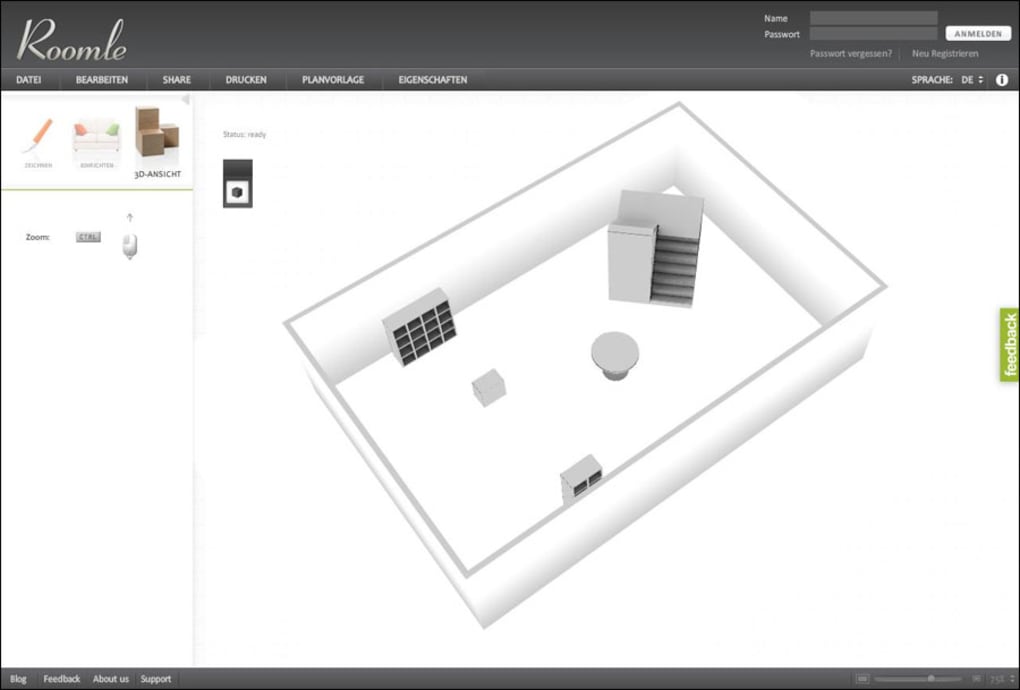
Roomle positions itself as a lightweight, cloud‑based alternative to traditional interior‑design software. Because it lives entirely in the browser, there’s no need to download or install bulky executables; you simply sign up, launch the workspace, and begin arranging objects on a virtual floor plan. The user interface is clean, with a left‑hand toolbar for selecting walls, doors, windows, and a catalog of furniture items.
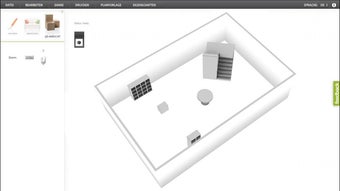
Drag‑and‑drop functionality makes arranging objects intuitive, while real‑time 3D rendering gives you an immediate sense of depth and scale. The app also supports saving projects to the cloud, sharing them via a unique URL, and exporting snapshots as PNG images for presentations or client reviews. While the free tier covers most basic needs, premium upgrades unlock higher‑resolution renders and an expanded furniture library.
Feature List
- Browser‑based design environment—no installation required.
- Responsive drag‑and‑drop interface for walls, doors, windows, and furniture.
- Real‑time 3D preview with orbit, pan, and zoom controls.
- Multi‑language support (English, German, Portuguese).
- Cloud project storage and shareable links for collaboration.
- Export options for PNG images and PDF floor plans.
- Extensive free furniture catalog with the option to add custom items.
- Integration with popular e‑commerce platforms for direct product linking.
- Regular updates and bug‑fix releases from the Netural Communication team.
- Secure HTTPS connection ensuring data privacy during collaboration.
Installation, Compatibility, Pros & Cons, and Frequently Asked Questions
Installation & First‑Time Use
Getting started with Roomle is straightforward. Since it is a web app, you only need a modern browser and an internet connection. Follow these steps:
- Open your preferred browser (Chrome, Firefox, Safari, Opera, or Edge).
- Navigate to the official Roomle website (https://www.roomle.com).
- Click the “Sign Up” button and create a free account using your email address or social login.
- Verify your email if prompted, then log in to the dashboard.
- Select “Create New Project,” name your space, and choose the room dimensions.
- Use the left toolbar to add walls, doors, windows, and furniture. The 3D view updates instantly as you make changes.
- When finished, click “Save” to store the project in the cloud or “Export” to download a PNG snapshot.
The entire process takes less than five minutes, even for users new to interior‑design tools. Because all rendering happens on the server side, even low‑spec computers can enjoy smooth performance, provided they have a stable internet connection.
Compatibility (itemprop="operatingSystem")
Roomle is designed to be platform‑agnostic. It runs on any operating system that supports a modern web browser, including Windows, macOS, Linux, Chrome OS, iOS, and Android. The responsive design adapts to tablet screens, allowing you to sketch ideas on a touchscreen device while on the move. However, for the best experience, a desktop or laptop with a full‑size keyboard and mouse is recommended, especially when working on detailed floor plans.
Pros and Cons
- Pros:
- Completely free for core features—no hidden fees.
- Runs in any major browser; no software installation.
- Intuitive drag‑and‑drop workflow suitable for beginners.
- Real‑time 3D rendering provides instant visual feedback.
- Cloud‑based storage simplifies sharing and collaboration.
- Multilingual interface expands accessibility.
- Regular security updates keep data safe.
- Cons:
- Limited furniture catalog in the free tier compared to premium competitors.
- Performance can be affected by slow internet connections.
- Advanced rendering options (high‑resolution output) require a paid upgrade.
- No offline mode—an internet connection is mandatory.
- Export formats are limited to PNG and PDF; no native DWG or OBJ export.
Frequently Asked Questions
Is Roomle truly free, or are there hidden costs?
Roomle offers a fully functional free tier that includes all essential design tools, cloud storage, and basic export options. Premium features such as high‑resolution renders and an expanded furniture library are optional and require a subscription, but there are no hidden fees in the free version.
Can I use Roomle on a mobile device?
Yes. Roomle’s responsive design works on smartphones and tablets running iOS or Android. While the full feature set is available, the drag‑and‑drop experience is smoother on a desktop with a mouse and keyboard.
How secure is my project data?
All communications between your browser and Roomle’s servers are encrypted via HTTPS. Projects are stored on secure cloud servers, and you control access through shareable links that can be revoked at any time.
Do I need a powerful computer to run Roomle?
No heavy hardware is required because most rendering is performed server‑side. Even modest laptops or netbooks can handle the interface smoothly, provided you have a reliable internet connection.
Can I export my designs for use in other CAD programs?
Roomle allows export of 2‑D floor plans as PDF and snapshots as PNG. Direct export to CAD formats like DWG or 3‑D model formats (OBJ, FBX) is not supported in the free version, though you can capture high‑resolution images for presentation purposes.
Conclusion & Call to Action
Roomle delivers a compelling blend of accessibility, ease of use, and real‑time 3D visualization—all without demanding a download or a steep learning curve. Its browser‑based architecture makes it an ideal choice for freelancers, small design studios, and homeowners who need a quick, free tool to experiment with interior layouts. While power users may eventually outgrow the free catalog and wish for offline capabilities, the core experience remains robust and reliable. If you’re looking for a secure, multi‑platform solution that lets you sketch, share, and iterate on design ideas instantly, Roomle is definitely worth a try.
Ready to start designing your dream space? Download Roomle now, create a free account, and bring your interior concepts to life in minutes.
Roomle impresses with its seamless browser experience, intuitive drag‑and‑drop tools, and real‑time 3D preview. The free tier covers most everyday needs, though professionals may want the premium catalog for larger projects. Overall, it’s a solid, secure, and user‑friendly design app for anyone interested in quick interior visualisation.



.png)



